
Passphrases that change every time.
Create. Share. Verify.
Is that call really from who you think? A passphrase that changes every time lets you check, easily. Files you share go encrypted under a strong passphrase that is still easy to say on the phone, so there is no more emailing the password after the zip. Passwords you share can be strong too, and handed over easily and safely. Completely free, no ads, no account.
- Create and Share Passwords
- Set Up and Manage Passphrases
- Verify Family and Friends
- Verify a Group
- Verify a Business To be released soon
- Exchange Files Securely
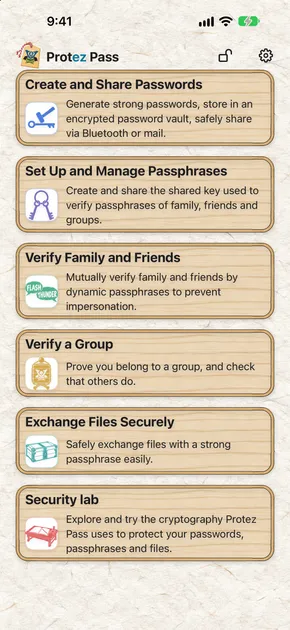
Protez Pass takes the age-old passphrase and rebuilds it with modern cryptography, so sharing secrets safely and confirming who you're talking to are both simple.

The Wi-Fi. The smart appliances. The system your whole team logs into. You share these passwords with family and coworkers, they never fit neatly into a password manager, and a strong one is a pain to create and a pain to pass on. So they stay weak…
Shared passwords: make them strong, hand them over safely.
- Generate strong passwords that fit whatever the system allows: the characters, the symbols, the length. Skip look-alikes like 1 and l, go Unicode if you like, and check the strength as you go.
- Every password lands in an encrypted vault and travels encrypted, over Bluetooth or by email. Send the easy-to-say key Protez Pass generates by another route, like a phone call, and you never have to email a zip and then its password to the same inbox again.
- Your vault stays on your device and is never sent to us. Back it up, still encrypted, with the backup system you already use. (Available backup options depend on your OS.)
Strong passwords, just as easy to share as weak ones.
Shared passwords tend to end up short and simple, because they have to be easy to pass on. Protez Pass creates a strong one in moments, shares it safely, and keeps it strongly encrypted on your device.
How passwords get shared today
1 · Keep it easy to say
It gets read out to family or coworkers, so it ends up short and easy to guess.
2 · Paste it into email or chat
Email and chat can be hacked, and the password sits in plain text in your inbox or chat history.
3 · Write it on a sticky note
Anyone who picks it up has it.
- Strong passwords are a pain to create and share, so weak ones win.
- Passwords left in plain text in histories and notes are leaks waiting to happen.
- Every change means sharing it all over again, so weak passwords stick around.
Sharing with Protez Pass
1 · Generate a strong password
Create a strong password in moments, tuned to the rules of the system it's for: allowed characters, symbols, length. Skip look-alike characters, or even create a Japanese password.
2 · Share it safely
Send it over Bluetooth with encryption designed to be hard to break, even for quantum computers. Or lock it with a passphrase that's easy to say and, at the default length, strong, send it by email or chat, and share the passphrase another way, like a phone call.
3 · Keep it in an encrypted vault on your device
Your vault is created only on your device, so it can't leak from a server.
- Nothing to memorizePull any password from your vault the moment you need it.
- Created in an instantCheck strength, disallowed symbols, and length as you create.
- Shared safelyAdvanced encryption makes sharing simple and safe, with no password left behind in any history.
- Stored safelyYour vault opens easily for you, while a hacker would face enormous time and cost to crack it.
- Designed to stay on your deviceCreating, storing and sharing all happen inside the app on your device.
Is it really them on the line, or a scammer borrowing their voice? Right now, you can't tell…
- AI can clone a familiar voice in seconds. With one call to someone you know, a scammer can easily get a voice sample and impersonate them.
- The number on your screen can be faked, so it proves nothing.
- Phone networks were never built to let both sides prove who they are.
A fresh passphrase every time. Checked by both of you.
- Forget the voice. Forget the number. Five short words tell you if it's really them.
- The passphrase changes every time, so a scammer who overheard the last one gets nothing. And both of you can check.
Not a fixed passphrase, but a new one every time.
A passphrase that never changes is only safe until someone overhears it. Register someone once, and Protez Pass gives you a fresh passphrase every time.
The old-school passphrase
1 · Both genuine
⭕️ Confirmed genuine
If you both know the passphrase, you both get it right.
2 · A scammer who doesn't know it
❗️ Impersonation revealed
A scammer who doesn't know the passphrase can't answer.
3 · A scammer who overheard it
The impersonation succeeds
A scammer who overheard the passphrase just repeats it and passes as the real person.
- Too many to rememberA different passphrase for every person adds up fast.
- No defense against eavesdroppingAnyone who hears it once can reuse it to impersonate.
- Leaks go unnoticedThe same passphrase stays in use, so you can't tell when or where it got out.
The Protez Pass passphrase
This time
⭕️ Confirmed genuine
Protez Pass shows you three words. Read them out. The other person enters them in their Protez Pass, which shows two words for them to read back. Your screen shows the two words to expect. If they match, it's really them. Swap roles and they can verify you too.
Next time
⭕️ Confirmed genuine
The words are picked at random every time.
A scammer who overheard last time's words
❗️ Impersonation revealed
Knowing last time's words won't give the scammer this time's. They can only stall or bluff, and that gives them away. If someone reads you words from an earlier check, Protez Pass, which records every set it has used, warns you and records when it happened.
- Nothing to memorizeA fresh passphrase is generated and shown on screen, automatically.
- Eavesdroppers get nothingOverheard words don't answer the next check, and old words read back to you raise a warning.
- Verification goes both waysYou check them, and they check you.
- Share a key onceShare a key with someone once, easily and safely, the same way you share a password.
- Beyond phone callsVerify people the same way over SMS, in messaging apps, or face to face.
- Numbers work tooAny check can be done in four-digit numbers instead of words, recommended when you don't share a language or words are hard to hear.
How the cryptography worksSomewhat technical content. You don't need to understand all of it to use the app.
A check works in three steps
Share the secret once
When you register a contact, your phone and theirs share a random 256-bit key once. The key is stored encrypted in a secure place on both phones, and the key itself is never read out during a check.
Shared over Bluetooth (X-Wing) or in a file sealed with Argon2id and AES-256-GCM.
Receive random values from the party checking you
Each check, the checking side draws three random words. The answering side computes a two-word answer from the key and the three words it heard, with the one-way function HMAC-SHA256.
This is called challenge-response. A strict check also uses a third word from the same result.
The formula (the answering phone computes it; the checking phone does the same)
K = shared key (256 bits)
c = indices of the 3 words heard
X = c + the direction of the check + metadata

M = HMAC-SHA256( K, X )
a_0, a_1, a_2 = numbers taken in order from M, mod L (the answer word indices);
  the third is taken so that no word is favoured

Reverse (when the other side is checked too): X contains c (their three words), the three you read out first, the direction of the check, and metadata

Check: compare the answer words you heard with a_0, a_1 (and a_2 when strict) (an SOS answer also passes and shows the SOS notice)
Checked by the same calculation
The same key and the same words always give the same answer. The checking phone does the calculation itself, and when you type in the two words you hear, it compares them with its own result.
If they want to check you too, swap roles: you answer the three words they drew. This answer also covers the three words you read out first. Your answer appears only after theirs has matched.
Why this is strong
An overheard answer is no use
Each time you check someone, your phone draws three words at random. There are about 470 billion combinations in English, about 140 billion in Japanese and 1 trillion with numbers, so the same three words realistically never come up again. An overheard answer would work only if your phone drew exactly the same three words, which realistically does not happen.
Answers come from the key through a one-way function
The key is a random 256-bit value, the words are random too, and answers come from HMAC-SHA256, a one-way function. No way to reverse HMAC-SHA256 has been found, so however many spoken words someone collects, working out the key from them is not realistic.
A made-up answer almost never works
Each set of words allows only 3 tries, and a random answer passes about 1 in 30 million times in English (about 1 in 13 million in Japanese). With a three-word answer it is about 1 in 235 billion in English (about 1 in 70 billion in Japanese), so answering at random is not realistic.
Reused words are detected
Protez Pass records the words already used with each contact, so if words from an earlier check are entered, it warns you. The time of the reuse is recorded too.
What a matching answer shows: strictly, only that the other party holds the same key. The key is kept in the encrypted vault and even its user cannot see it, so it does not normally leak, but it could be exposed if both routes used to share the key were intercepted (for example, both the email and the phone call) or if a device is compromised by malware or similar. If you are concerned, create a new key and share it again over a safe route.
Don't take their word for it. Verify with the real business's passphrase.
Anyone can say a company’s name. When the business is registered with Protez Pass for Biz, its agent calls your number and reads out the passphrase right there on the call, so you know.
The business passphrase
1 · Add the business and your number once


Scan the Protez Pass QR code from the business's website, mail, or front desk.
- Company
- Protez, Inc.
- Corporate number
- 7040001135669
- Head office
- 2596-9 Omori, Inzai, Chiba, Japan
- Website
- protez.jp
- Registered
- November 1, 2026
Add the Business pass (a pass showing the business has been verified) and your numbers once.
2 · The real business calls
Waiting for the agent’s words… under 45 s
⭕️ Protez is confirmed genuine
The agent reads two words, then three more and a two-digit number a moment later. Type what you hear: your app checks it’s the real business, calling the number you registered.
3 · An impostor calls
✕ No match. Hang up
An impostor doesn’t know the right words. Even if they get the real business to call them and pass its words on, those words are tied to the scammer’s number and fail on your phone.
- Every business verified by ProtezWe confirm that every company and sole proprietor we register actually exists and verify its representative's identity, through a transfer from a business bank account and a commercial registration electronic certificate or a My Number Card, and we refuse applications that try to impersonate a business.
- One scan, one numberScan the business’s QR code, add your own number, and you’re set.
- Nothing about you reaches usNot your numbers, and not which business you checked: we keep no log of the lookups. The data that verifies a business is signed by us and comes from public DNS, checked with DNSSEC by your DNS resolver; you can choose your own resolver.
A password-protected zip and its password, sent to the same address. Does that really keep the data confidential?
- The file and its password land in the same inbox, so anyone who breaks into that inbox or intercepts the mail can leak the data.
- Passwords sent this way tend to be short and simple so they are easy to pass on, and short passwords fall to a brute-force attack quickly.
- Both stay in the mail history, so the damage from a broken-into mail account keeps growing.
Encrypt with a strong passphrase that is easy to say, and send the passphrase another way.
- Protez Pass encrypts the file strongly; send it the usual way, by email or chat.
- The passphrase is easy to pass on over another channel, such as a phone call. An attacker who breaks into the inbox does not know it, so they cannot open the file.
Protez Pass makes it easy to encrypt with a strong passphrase, so you can share files securely.
Sending an encrypted file and its password to the same place means a broken-into or intercepted mailbox leaks both. Protez Pass encrypts the file strongly and lets you pass the passphrase on easily over another channel, such as a phone call.
Sending files today (zip + password)
1 · Make a password-protected zip
The password ends up short and simple so it is easy to pass on, and remembering it is one more chore.
2 · Email the zip
The encrypted file lands in the recipient’s inbox. That part is fine.
3 · Email the password to the same address
File and password arrive in the same place, so anyone who breaks into or intercepts the mail gets both, and the data leaks.
- Same route for both, so once the mail account is broken into, the file leaks despite the encryption.
- The file and the password stay in the mail history, so the damage from a broken-into mail account keeps growing.
- Long, strong passwords are hard to pass on, so a password meant to be read out on the phone ends up weak, and a brute-force attack unlocks it easily.
Sending files with Protez Pass
1 · Encrypt it in Protez Pass’s “Secure file exchange”
Pick a file. Protez Pass draws a strong passphrase and encrypts the file. Up to 64 files can go into one, and the file name can be hidden.
2 · Send the encrypted file
Send it by email, chat, AirDrop or cloud storage. Even if the file is stolen, it cannot be opened without the passphrase.
3 · Tell the passphrase another way, such as a phone call
Read it out on a phone call. The recipient types it into Protez Pass, opens the file and saves it as an ordinary file on their device.
An attacker who breaks into the mail account gets only the strongly encrypted file. Without the passphrase it does not open.
Phone call
- Beats zip-and-passwordEven if someone breaks into your mail account, the password is not in the mail, so they cannot decrypt the file and it stays confidential.
- A strong passphrase that is easy to say on the phoneProtez Pass uses Argon2id with 128 MiB of memory, so every single guess is costly. With the passphrase it opens within a few seconds at most; without it an attacker must try every combination, so cracking a long enough passphrase takes masses of GPUs and an enormous amount of time and money, which makes it impractical to crack. Even a 5-word passphrase takes 10,000 GPUs about 45,000 years on average and costs about $4 trillion.
- Set an expiry for openingChoose an opening deadline of 1, 3, 7 or 30 days. After that Protez Pass no longer opens the file, and the sender’s passphrase record is cleared (files already opened are not affected).
- No passphrase to exchange with a registered contactWith a pre-shared key, the file can be opened without telling the other person a passphrase, so you no longer need to exchange one.
Strong passwords and passphrases. Created, shared, and verified with ease.
- Create and Share Passwords
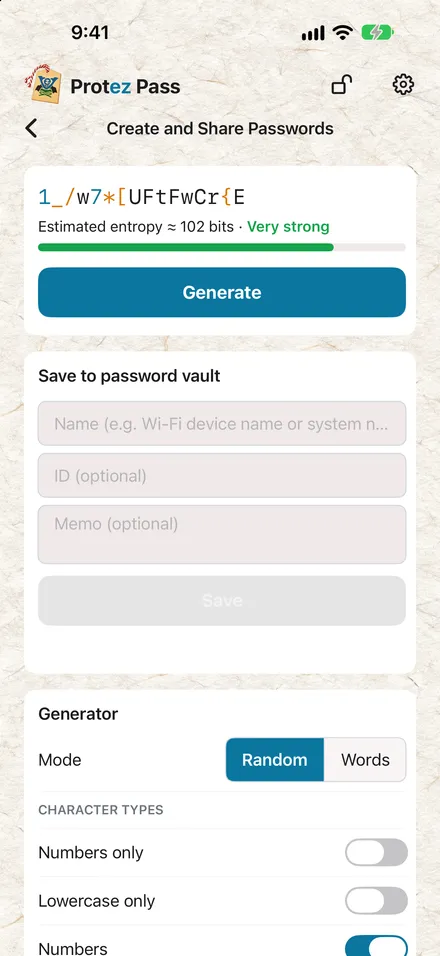
Strong passwords, made easy
Generate at random from letters, mixed case, digits, and any symbols you choose, at any length. Or build from any number of English or Japanese words (Japanese only where the password accepts Unicode). Save to a strongly encrypted vault and share safely over Bluetooth or as a file.
- Set Up and Manage Passphrases
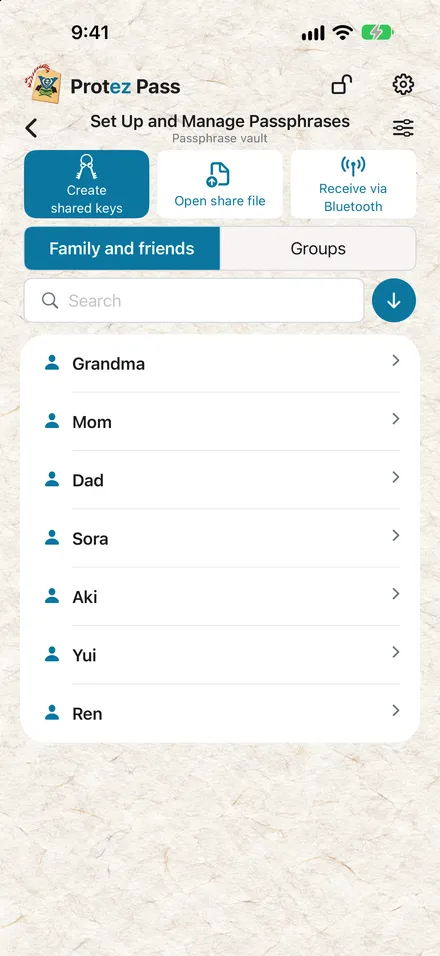
Share the shared keys that verify passphrases
Create and share the passphrase shared keys you use to verify family, friends, and organizations. Like your passwords, they are protected in a strongly encrypted vault.
- Verify Family and Friends
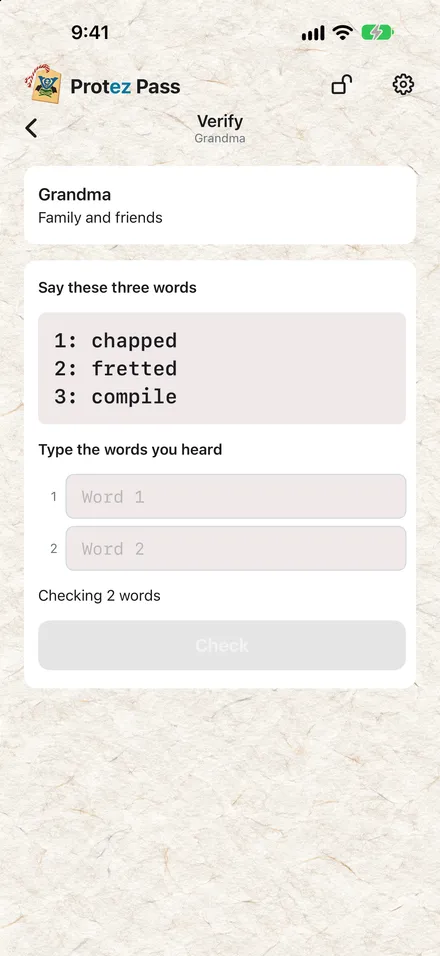
Is that really them calling?
Verify each other with anyone you've registered, using a passphrase that changes every time, and stop impersonators. You can also use number passphrases instead of words. If a criminal is threatening you, you can send the other person an SOS without the criminal noticing.
- Verify a Group
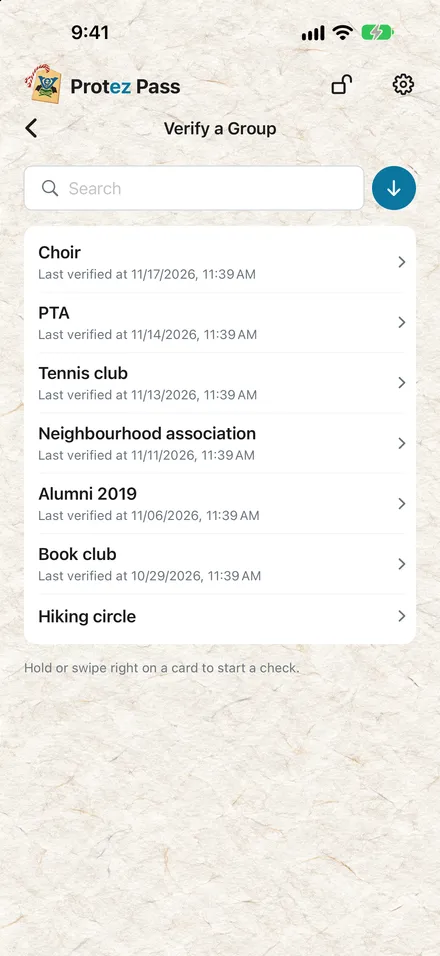
Group membership, verified both ways
Confirm that the other person holds your group's shared key, or the key of a group linked with yours.
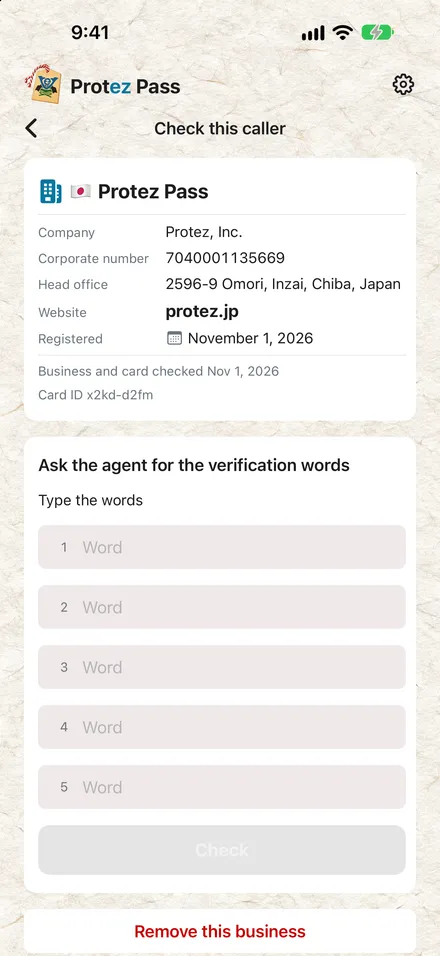 Verify a BusinessTo be released soon
Is that call really from their agent?
Confirm that the other party is a business registered with Protez Pass.
- Exchange Files Securely
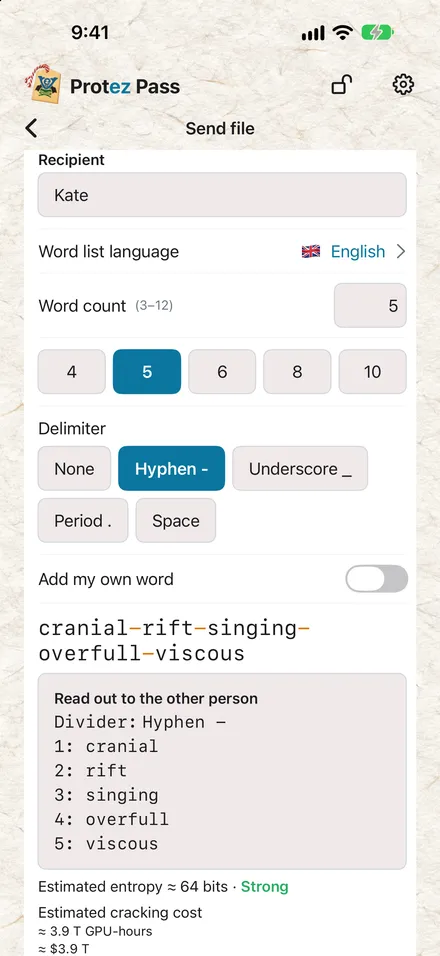
Files, exchanged safely and simply.
No more emailing a password-protected zip, then its password to the same address. Encrypt them with a strong passphrase that's easy to share, pass it on by a different route from the file, and your data travels safely.
Screenshots are from a version in development and may differ from the released app.
Getting started with Protez Pass
Get it free
Get it free from the App Store on iPhone, or download it free for Windows, Mac, or Linux. No ads, no account, and no personal information sent to us. None at all.
Create passphrases that change every time, with ease
Create strong passwords, and passphrases that change every time, in moments. Share passphrase shared keys with each person or group you want to verify, and add a business by scanning its QR code.
Share and verify
Share the passwords and passphrase shared keys you create easily and safely over Bluetooth or as a file. Files you share are strongly encrypted, and the key to open them is a passphrase that is easy to pass on. A passphrase that changes every time lets you verify the other person with high confidence.
Privacy & Security
A next-generation app from security professionals: effortless to use, built for strong security.
Built so nothing leaves on its own
Generating, storing and sharing passwords and passphrases all happen inside the app on your device. The app is designed with no HTTP client: it uses the internet only for DNS over TLS to up to three resolvers you choose (Quad9 and Cloudflare by default), to check at launch, at most once a day, whether a newer version is available (the query carries no information about you) and to fetch a business's DNSSEC-signed Business pass, signed by Protez, when you use “Verify a Business”, and for NTS time sync with up to three time servers you choose. Your device looks up the time servers' names with its usual DNS. The app opens no connection to Protez. Bluetooth is used only to share passwords and passphrases; files go through your device's own share options.
Modern cryptography
Argon2id for key derivation, AES-256-GCM for symmetric encryption, the hybrid post-quantum X-Wing (ML-KEM-768 and X25519) for Bluetooth, ML-DSA as the post-quantum digital-signature algorithm, with Business passes fetched over DNS over TLS from a DNSSEC-signed zone (checked by your DNS resolver) and verified against the ML-DSA signature. Changing passphrases are computed with HMAC-SHA256 from a 256-bit key held only on the phones of the people who share that passphrase.
Defense in depth, doubled
On the realistic assumption that vulnerabilities are sometimes found even in security libraries, Protez Pass does more than stack layers of defenses as classic defense in depth does: where it can, it puts two or more independent defenses inside a layer. Random numbers for keys and passwords come from two separate system random APIs, combined so that a bug in either one alone does not weaken them. Bluetooth transfers are protected by X-Wing, which joins ML-KEM-768 and X25519, so exploiting a vulnerability in one of them is not enough to break through. If a flaw is found in one defense, the other keeps protecting the layer until it is fixed.
Built to collect nothing about you
Following the principles of privacy by design, we collect no user information.
Guards against accidental leaks
Copied passwords and passphrases are cleared from the clipboard after 60 seconds. Sharing stays off for each vault until you turn it on. A cover hides passwords in the app switcher, the app locks when you leave it (on a computer, when you hide or minimise it), and it locks automatically when idle (adjustable from 1 to 15 minutes), so passwords do not leak unintentionally.
Checked against known leaked passwords
When you create or change your master password, it is checked inside the app against roughly the top 100,000 previously leaked passwords, with a warning on a match. No data is sent out for the check.
Data we never receive
- Generated passwords, passphrases and vault contents (Protez Pass is designed with no HTTP client and sends nothing to us)
- Personal information such as your name or email address (there is no account to create), and the phone numbers you register for business checks
- Biometric data such as Face ID / Touch ID (handled by the device OS; Protez Pass only processes the authentication result from the OS)
- Usage logs, analytics and crash reports (the app never sends them to us)
AI-native security
Designed by security professionals, with code written mainly by frontier AI. Cybersecurity experts and frontier cyber AI review Protez Pass again and again; every vulnerability they find is confirmed, fixed and verified again.
Built by internationally certified security pros
Security professionals with international certifications such as CISSP design and build Protez Pass's security end to end, following DevSecOps practices that bake security into design, development, and operations.
Verify, confirm, fix, verify. Then repeat.
When AI can find and exploit a vulnerability in moments, a point-in-time “assurance” such as an audit isn't enough. Strength comes from a loop that never stops: frontier cyber AI and cybersecurity experts verify, confirm, fix and verify again, over and over.
Layered defenses that assume attack
We design on the assumption that attacks will come and vulnerabilities will be exploited, with layer upon layer of defense so security still holds.
About the developer
株式会社プロテジ (Protez, Inc.)
2596-9 Omori, Inzai, Chiba 270-1327, Japan
Our mission is to let anyone achieve advanced security easily.

KOBAYASHI Hiroaki
President & Representative Director, Protez, Inc. (also a full-stack cloud and security engineer)
Worked in corporate functions (accounting, internal audit, finance) at two Japanese global companies, then led new-business launches, overseas business and system development at two small and mid-sized companies. Now runs Protez, Inc., a company specializing in cybersecurity. Developer of Protez Pass.
Key credentials
- CISSP — International information-security certification ((ISC)²)
- CISA — International information-systems audit certification (ISACA)
- U.S. CPA — U.S. Certified Public Accountant
- MBA — Keio University Graduate School of Business Administration – HEC Paris double-degree program
FAQ
General
Should I use Protez Pass to manage passwords only I use, such as for my bank, email and websites?
For passwords only you use, please use an existing password manager. Protez Pass closes the gap for the passwords that have to be shared and that existing password managers find hard to manage, such as the Wi-Fi, systems your family or team log into with a shared account, IoT devices and the TV: it lets you create them strong and share them safely.
Is it recommended for use at work?
Always follow your organization's policy. We are also developing a professional version, optimized for corporate zero-trust environments, that lets an organization verify businesses' passphrases and exchange shared keys efficiently.
Do I need to create an account?
No.
Does Protez Pass collect data?
Protez Pass does not collect user data. The password and passphrase vaults stay on your device and are never uploaded anywhere, and no account is needed.
Why is Protez Pass free?
Because our revenue comes from the businesses that use the upcoming “Verify a Business” feature, or the professional version of Protez Pass, which is optimized for zero-trust environments and makes sharing keys within an organization easier. Being free means many people use Protez Pass, which also makes it attractive to our business customers. Above all, Protez's mission is to let anyone achieve advanced security easily.
Does Protez Pass show ads?
No. Protez Pass shows no ads, and we have no plan to add any. Our revenue comes from businesses, so we have no need to make money from advertising.
What if I forget my master password?
Protez Pass has no recovery server and no back door, so without the master password the vault cannot be opened, and the passwords and passphrase shared keys saved in it can no longer be reached. If you do forget it, choose “Forgot master password?” on the unlock sheet and create a new vault. The vault whose master password you forgot is not deleted but kept, so if you remember the old master password later, type it in and that vault can be merged into your current one. Always choose a master password the strength meter rates Strong or better, and be sure to write it down, on paper for example, and keep it somewhere safe.
How do I delete a vault?
You can delete an archived vault. In Settings, open “Archive” in the “Vault” section, choose “Delete vault” on the vault, and enter your master password. A deleted vault cannot be brought back, and a copy in a backup made earlier is not removed. A vault archived by “Forgot master password?” needs the old master password, so it stays until you remember it. The vault you are using cannot be deleted, so that nobody can delete it while the app is left open. Deleted passwords and passphrase shared keys stay listed in Recently deleted for 30 days. Removing the app deletes the vaults on this device. Note that items Protez Pass put in the Keychain can stay after the app is removed (see “What stays after I remove the app?”).
What stays after I remove the app?
Items Protez Pass put in the Keychain, such as the device key used by “Also require this device” and the item behind Unlock with Face ID, can stay after the app is removed.
What does Vault access history record?
It records when someone tried to open the vaults on this device and how it ended, such as opened, wrong password or biometric check failed. It also records when an archived vault was deleted. It stays on this device, can be read only after you unlock with the master password, and Clear history leaves one line saying it was cleared.
Can I move my passwords and passphrases to my other devices?
Yes, you can. Turn on Shareable for the password vault, then send the passwords you want to your other device with Share via file, or with Share via Bluetooth between iPhones and iPads. To move your data to a new device, for a vault set to “Vault data alone can't open it”, tick the option to encrypt the backup, make an encrypted backup of the device, then move it to the new device.
Is Protez Pass safe against code-breaking by quantum computers?
It is secure enough against the quantum code-breaking methods known today. Password and passphrase vaults and share files are protected by the Argon2id key derivation function, which turns a passphrase into a key, and AES-256-GCM symmetric encryption. Against symmetric encryption a quantum computer at most halves the strength, so a 256-bit key with a long passphrase is secure enough. Quantum computers threaten conventional public-key cryptography such as RSA and elliptic curves, but Protez Pass does not rely on these alone. For Bluetooth between devices it uses X-Wing (ML-KEM-768 and X25519), which combines the post-quantum ML-KEM with a conventional scheme, and for verifying businesses it uses ML-DSA, a digital-signature algorithm resistant to quantum code-breaking.
Create and Share Passwords
Which password length should I pick: 12, 14, 16, 18 or 20?
If the password can be handed over in Protez Pass and copied in as it is, a longer password costs no extra effort, so picking the longest length the system accepts is safest. The lengths offered are for passwords that have to be typed by hand. 12 characters suits passwords typed on devices that are awkward to type on, such as a TV, a game console, a printer's control panel or an appliance. 14 characters suits a home guest Wi-Fi that visitors type in by hand now and then. 16 characters is for the home Wi-Fi you and your family use, or shared devices. 18 characters suits systems that many people use for a long time, such as an office Wi-Fi or shared devices. 20 characters suits important devices and systems, such as the admin page of a router, NAS or printer, a team system or a shared console. If a device does not accept some symbols, don't turn symbols off altogether; untick those symbols in the list of symbols to use instead. If you turn off symbols or uppercase letters, choose the next length up.
What is the amount shown as the cracking cost?
It is the theoretical cost for an attacker to crack the password by brute force. It assumes an attacker who has a copy of the encrypted password vault or share file rents GPUs at $1 per GPU-hour, each trying 1,000 passwords per second against a 128 MiB key derivation (the same Argon2id setting as a share file). A larger key-derivation memory slows the attack in proportion (twice the memory, half the guesses per second). The figure is the average case (half the candidates tried); the real figure may be higher or lower. At or above 10¹⁵ GPU-hours the cost is so vast that it reads “Realistically impossible”.
What do the strength bands mean?
They are a guide based on the theoretical cracking cost. Weak: below $10,000, Fair: below $1,000,000, Moderate: below $100,000,000, Strong: $100,000,000 or more, Very strong: when the cost reads “Realistically impossible”.
Why does a typed passphrase show fewer bits than its length suggests?
A password's bits are computed two ways, from its characters and from its words, and the lower value is used: as characters (length × the size of the character sets used) and, when it is made of words from the app's word lists separated by hyphens, spaces or similar, as words (each list word counts as one draw from the list). So a six-word passphrase shows the same bits whether you generated it or typed it.
Passphrases
When do you recommend using a passphrase?
Checking with a passphrase on every call is a chore and takes time, so we recommend it only when the call matters, such as when money is involved or important information is exchanged. You can also check partway through a call. When you share passwords or the shared keys for passphrases, Bluetooth is the safer way, because there is less chance of a leak.
How do I use the passphrases?
First, create shared keys in Set Up and Manage Passphrases for each person you want to verify. You can choose the language of the passphrase words, and numbers can be used for verification too. Shared keys can be shared safely over Bluetooth or as a file. To verify a person or a group, choose Verify Family and Friends or Verify a Group, and choose who or which group to verify. Then answer “Who is verified first?”: on a phone call it is natural to verify the caller, so choose “Me” if you made the call and “The other party” if you received it. The passphrase changes every time, and reusing an earlier passphrase raises an alert. Each verification is recorded in the check history, which you can see on each contact in Set Up and Manage Passphrases. To verify a business, first add its Business pass by scanning the QR code on its website or in its printed materials. When the business calls, choose it in Verify a Business and enter the passphrase the agent reads out.
How is the changing passphrase created, and can it be matched by chance?
When you register a contact, your phone and theirs share a random 256-bit key once, safely: over Bluetooth with X-Wing, or in a file protected with Argon2id and AES-256-GCM. Each check, you pick three random words. The other party computes their two-word answer with HMAC-SHA256 from the key and both sides' words, so even someone who overhears earlier words will face different words next time. A random two-word answer passes about 1 in 30 million tries in English (about 1 in 13 million in Japanese). If you need a stricter check, ask for a three-word answer: about 1 in 235 billion in English (about 1 in 70 billion in Japanese), so a match by chance is not realistic. Note that words already used are recorded, so if old words are entered again the app warns you and records when that happened.
Are passphrases in numbers as safe for sharing and verification?
Numbers are safer. Group for group they are at least as strong as word passphrases, and a random answer is less likely to pass a check than with words. A numbers passphrase is read in groups of four digits, and each group has 10,000 possibilities (about 13.3 bits). One word from the English list has 7,776 (about 12.9 bits) and one Japanese word 5,191 (about 12.3 bits), so a group has more possibilities than a word. A verification reads three groups (12 digits) and the answer is two groups (8 digits). A random answer is right about 1 in 50 million times, lower odds than with words (about 1 in 30 million in English, 1 in 13 million in Japanese); a strict three-group answer is about 1 in 500 billion. For a sharing passphrase, too, each group is stronger than one word.
What is “Recreate shared keys” in Set Up and Manage Passphrases?
If you find that both routes you used to set up a passphrase were compromised by an attacker, or your device was taken over through weak authentication settings or a malware infection, the secret the passphrase uses may have leaked. An attacker could then impersonate you, so recreate the shared keys and share them again over a safe route.
Are passphrases created with Protez Pass absolutely safe?
They cannot be called absolutely safe, but the key is a random 256-bit value and passphrases are created with HMAC-SHA256, so no practical way to work back to the key has been found. The real risks are a device with weak authentication being taken over by an attacker, both sharing routes being intercepted when the shared keys are shared, and malware on a device leaking the shared keys. Keep your devices secure, and recreate the shared keys if you suspect a leak.
Exchange Files Securely
How does it solve the PPAP problem (sending an encrypted file and its password to the same email address)?
PPAP sends the encrypted file and its password (the encryption key) to the same mailbox, so an attacker who breaks into the mailbox or intercepts the mail traffic gets the encrypted information. Protez Pass turns the password (the encryption key) into a passphrase you can easily move to another route, such as a phone call, so an attacker with access only to the mailbox or mail traffic cannot get the passphrase (the encryption key) and cannot open the file. At the default length (8 words), the passphrase would take thousands of GPUs far longer than a lifetime to break, and the app shows an estimated cost if you choose fewer words, so you can share passwords and send files safely.
Are files exchanged with Protez Pass safe?
Protez Pass exchanges files safely, but that does not mean the contents of a file the other party sent are free of malware. A file encrypted by Protez Pass cannot be virus-checked as it is, so always run a virus check before executing an exchanged file, and open only files from people you trust. Never open or execute a file when you do not know who sent it. Note that the Windows version starts a virus check automatically.
Can I send several files at once?
Pick up to 64 files and send them together as one .protez file under one passphrase. The receiver opens it in Protez Pass and receives all the files together in one go.
What are pre-shared keys? Do I still have to pass on a passphrase every time?
Pre-shared keys let you share single-use file keys in advance with a counterparty you have registered in Set Up and Manage Passphrases (someone you already share a passphrase with), so that turning on “Use a pre-shared key” when you send saves you passing on a passphrase. If you send several files in a row, putting new keys in the first one is enough: until that person's receipt of your file is confirmed, “Attach new pre-shared keys” switches off by itself. If their app cannot find the pre-shared key, open the sent file's record and read them the 8 number groups shown there. The keys you hold for each other come back into step when you mark a file sent with new keys as received.
Do the pre-shared keys used for file sharing give forward secrecy (PFS)?
Each file has its own single-use key, so even if a key leaks, only that one file can be decrypted. Your app keeps a sent file's key until you mark it received, so once the other person's receipt is confirmed, mark the file received soon to delete the key.
What happens to files shared with pre-shared keys if the shared keys of the passphrase leak?
They can be decrypted: there is no forward secrecy against a leak of the passphrase's shared keys. The pre-shared keys are protected by the shared keys of the passphrase you hold with that person, so if those shared keys themselves leak, anyone who kept copies of the files you exchanged with that person using pre-shared keys can decrypt all of them, even after the pre-shared keys were deleted. If you suspect a leak, recreate the shared keys. To prevent a leak, share the passphrase's shared keys over a secure route, strengthen your device's authentication and security, and protect it against malware.
What happens to pre-shared keys if I restore a backup or move to a new device?
They are not carried over. Restoring a backup or moving to another device brings your vaults back, but the pre-shared keys you held before may no longer work. Until new ones are set up, send files with a passphrase as usual. Send that person a file with “Attach new pre-shared keys” on, and new keys are set up.